
Craft your own website
"My favorite aspect of websites is their duality: they're both subject and object at once. In other words, a website creator becomes both author and architect simultaneously."
Laure Schwulst, 2018
MORNING
Intro
- Who we are? Gossip round about websites.
Lucas and Balint graduated from ArtEZ Graphic Design. This is where we learned about coding website from scratch. We believe that sharing knowledge about technology empowers people who use these technologies. Knowing how to build a website can be a starting point to understand the internet as systems of infrastructures.
- We keen on to know why did you sign up and what do you know about websites? Where do you learnd about it?
Neocities.org
History
The spirit of neocities.org comes from the 90's/2000's Geocities, which was a platform where people could craft their own website and share it with eachother. We can think of it neighbourhoods of websites link together in a loose manner, very much community oriented organisation.
Geocities was the third most visited website back then -> yahoo.com buys them -> death of Geocities in 2009 -> revive the spirit of geocities in 2013 as neocities.org initiated by Kyle Drake.
The spirit:

Cultural significance
It is not a coincidence that we are hosting this workshop at De Kurk - the local queer bar in Arnhem. There is an interestin connection to explore between physical queer places and neocities.org as a queer place for personal/individual websites.
"Building a site involves coding, but also creative strategy for page layout, image use, focal points, colour motifs and other decisions not too far off from curating a show, or designing a visual arts magazine, the difference being that no one decides how things look except for you."
" personalised sites, many users have used Neocities to house different parts of the art industry digitally, often promoting their zines, curating art in cyber galleries and sharing their portfolios"
" users are brought together through community ‘webrings’, small hyperlinked widgets attached to their pages."
Webrings
Before google's search engine there was a very different way to browes the internet. Webrings are a very apparent method of connecting websites together, like a ringroad in the neighbourhood.
"pre-Google days, search kind of sucked"
Commercialazation of the web creates certain ways of interctin with the web.
"users decided to self-organize their pages through lightly-organized “rings” that would lead users to pages on a similar topic. Having a link somewhere on your site that ensured users that your page was a way station in a series of pages on a similar theme."
"when the ring gets big enough—it becomes more and more difficult to keep the ring ‘intact’ when pages go down.”"
"Web ring is like sharing a cup of tea with a group of strangers who are batty about a favorite hobby"

Let's break for lunch and browse neocities in the meantime.
AFTERNOON
Let's craft
Register a User
- go to [1]
- Fill in:
- Your-Site-Name
- Password
- e-mail adress
- confirm e-mail
HTML
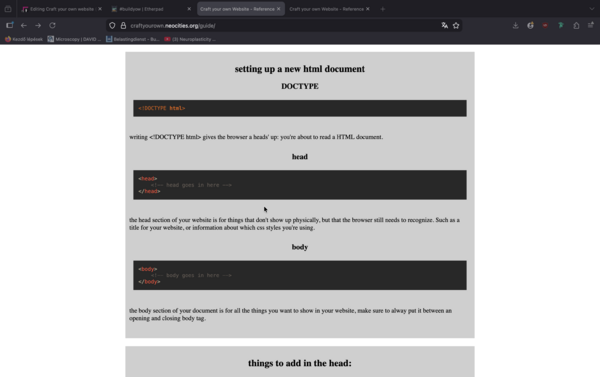
CSS
Inspect element
Take some time to browes and look around on other websites and try to apply CSS to your website.
WEBRING
Technical rider
Hardware
- Laptops
- HDMI Cable
- Screen
- Extension chord
- Table for at least 10 people
- Maybe separate extention for Display + our laptops
- 1 shared laptop to type code on + to show
- Internet connection
Software
Tutorials:
Resources:
Situating articles:
Net art examples:
SUMMARY
Hello here is the promised summary of our workshop from Saturday, reflections, next steps, and links for references , articles and help for coding. If you have any questions feel free to message here!
"Its nice to build websites and examine the reasons behind them because it gives purpose for making a website.
By bringing in community as part of making my own website, a whole new world opened up what social media could be. :)"
Duvan's next steps:
- linking pages for entries
- blog post section
- make it prettier
Kosta's next steps:
- render icons and add links to them
- text styling/ editing
Niels's next steps:
- make a homepage that link to sub pages (own pages)
Jana's next steps::
- put the word on different parts of the brain
- make those words a link for a subpage
- more fire!!! and chaos
Maei's next steps::
- make a section for healthy recipies
- subsection for :
Linklist
This is the original workshop planning:
This is where i got my information about Neocities and some metaphores, they are really nice articles:
Introduction about neocities:
Websites / sources mentioned by participants:
Other explanations about the internet:
References for coding HTML / CSS:
From us:
External links if you have practical questions about HTML, CSS:
DEBRIEF
What went well?
Setting the tone
- Take a moment to briefly summarise what we have done and going to do
- the atmosphere at the start was already very open, so if feel like we created a enviromnent where people felt safe enough to ask.
- it's ok if we don't reach that point, that's ok. we're at least going into that direction
- we didn/'t promise anything but that they will have sense of navigation how to do it, how to search for references themselves
Mutual pedagogy
- we are all in this together which opens up for mutual teachin moments
- How do we teach them about teaching themselves ??? >> ERROR fixing focus
- that moment we started thinking together how to design, we taught each other (also participant to participant)
- encourage to try things out and break them,bump into errors
- drawing the internet and the ip adresses
Building community
- people emphasised that the community aspect is very good
- we should keeep it diverse!!!!!!!!!!!!!!!!!!!!!!!!!!!!!!!!!!
- we have a signal group and fell free to send a message there !!!!>>>> COMMUNICATE
Giving context
- Situating into the hitory of the internet and cultural contex, we got feedback this gave purpose for making websites
- pick specific tool or method we want to work with on that sess and do a research on that
- most really enjoyed the background information (intro) at the start, with the added context
Communication:
- we need a website for the workshop series
- we have a signal group and fell free to send a message there !!!!>>>> COMMUNICATE
- sharing links and a summary after the workshop
Planning ahaed:
- we went through the planning the day before which helped with the timing
To practice:
- presentation moment in a form of webring!
- the notes on the next steps at the very end is a good practice
- the involvement in collective coding : e.g. choose a tag method and explain the code to me
What could be improved?
- checking opening time of the cafe so we dont wait outside in the rain
- could've had more back-and forth (between us) agree DJ + explainer method (or asking each other questions without "DJing", so you pass explanations to the other person)
- putting ourselves into the naive role and ask ""stupid"" questions
- bigger screen!!!!! +++ HOW??? do they have screen? can we leave a screen there?
- if we do more workshops, how often? once a month?
- dry sockets xD
- they have it, if we need special cables we can also leave them with the screen if needed.
- didn't get to inspect element, and didn't cover syntax highlighting
- yes and I think there could be a session just on that
- introductio into text editors
- B. proposes to to have the next session is about using text editor VS code
- L. proposes to have the next session about inspect element, and looking at other people's source code (look at history of inspect element, and devtools in the browser)
- sometimes it's hard to find the right words to explain (topics that we didn't prepare), that's where balint felt less connected to the participants. WHen you couldn't find the word, you think out loud, and felt like he's overexplaining.
- at the same time there were moments when improv turned out good and lets focus on those
- explaining flexbox and divs was a strugle
- i think with the explaining flexbox, it would've helped if we did that together, because then we can finish each others blocks.
- if multiple people have the same problem/question, maybe bring it back to the group and discuss it with everyone
- such as how to open in new tab.
- could've also done it with flexbox, good to keep our ears open for each others explanations as well if we're helping people individually.
- diring preparation, if we think we're got gonna get into a topic we should go over it again, and maybe perpare it just in case.
- Practice to teach one person and let that person to teach others
- Another practice to invole everyone into the collective editing by asking them to pick onel element to change and they have to tell the syntax and the steps
- { outline: 1px solid red; }
- view > page style > nostyle
- stylus extention for custom css on pages
- sometimes it was hard to talk over the noise and the music in the bar
- maybe nexttime in the back
- but ssaturdays the yoga is happening there
- Lucas: forgot to take space sometimes, DJ + explainer method / asking each other questions
- sometimes we both had a different interpretation of a question, and we'd both give a different answer.
- mis interpreting the question
- before we give an answer ask for clarification
- Lucas: maybe I should've taken the lead a (tiny) bit more on the introduction part. I feel like balitn explained a lot there. do your research babe
- messy moment: how do we disable CSS in inspect element.
view > page style > nostyle
- proposal , we could have a session to look at major social media platforms in a plane html format or at least it is a good way to show that every website is the same at the core
- we can also look into userstyles / custom css for third-party websites
- wbesite customization session
- there was some confusion around p tags
- go into divs and color them, there's also css styles (external ones) that you can load in, and it'll give like an outline to each element.
ARCHIVE
Agenda for 13-03-2026
- [] update tutorials with metaphores
- [] go through planning
- [] go trough techrider
Agenda for 07-03-2026
Cherry picking of refererences:
- [x] read through the articles and anotate them (craft focus)
- [x] make tech rider (hardware software)
- [x] write intro (incl. cherry picked references)
- [x] make an example wesite (show the codeand what it does) HTML+ CSS
- [x] make another website for the we(b)ring (we)bring
- [] update the workshop plan :
- [x] sharing experiences about coding
- [x] neocities: history and culture exploration round of sifferent websites and inspect!! to learn from each other (early internet aesthetics)
- [x] tags HTML
- [x] and CSS
- [x] webring
- [] presentation moment applouse
1. Everyday tech!
The workshop is using laptops and internet connection to learn basic HTML and CSS at https://neocities.org/ . At the moment we are two people me (valentin) and a friend of mine Lucas.
2. Place!
There is currently three possible hosts in Arnhem which is outside of the usual art school bubble:
THIS IS THE PLACE WHERE IT IS GOING TO HAPPEN:
- De Kurk - Queer cafe which is still somewhat connected to the art scene but there are many different people hang out there. Has a fast internet connection which is quite unsecured (prefect choice haha)
- ABC Libertas - Another cafe in Arnhem which is also a secondhand bookstore, usually people who go there have children and they are not related to the art scene altough they are located in the "Fashion District" the Mode Kartier. They have okay internet connection, and they told me that they not necesserily want 10 people to sit at one table with a computer (too much office vibes, as they say).
- Rozet - Rozet is the public library in Arnhem which also hosts different kind of events. This is a well established insttitute and huge building with five floors and good but very much like Eduroam internet connection.
- Communal Garden - ??? (no wifi, no electircity)
3. Crowd!
This is absolutely for people who doesn't know anything about building websites, but they want one (for themselves or their own hobbies or business).
Maximum 10 people so we can pay attention and help out with questions, also to keep it intimate.
4. Publishing!
We will use https://neocities.org/ which is nice because the websites will be publicly available immediately.
The documentation of the workshop will be uploaded here to this wiki page, and probably will appear in our portfolio website in a way...
For communication
- posters
- flyers
- social media stories
For documentation
- etherpad for sure
- pictures
- updating this wikipage with observation and reflection on how it went
5. Schedule
On one of these dates (weekends): 28th of February, or the 1st 14th or 15th of March? from 11:00 till 16:00.
The day:
Start:
- Who we are, why are we doing this?
- What is the internet?
- Introduction (regisetering to neocities)
Morning:
What is HTML?
These are the tags to start with:
- Head is for visitors to identify your website, basically the title. (The name of the building)
<head></head>
- Body is where we define some structure (rooms) and put all the content (furnitures).
<body></body>
- Write a two sentences that describes what is your website is about
<p
- Linking your website to other websites and/or social media profile .
<a href="https://blabla.bla"></a>
- Let others contact with you!
<a href="mailto:bla@bla.bla"></a>
- Make an inventory (hobbies, services, topics)
<li
- Put a picture of anything related to your website (usin online and local url)
<img src="" alt=""
What is CSS?
- Neocities has a really nice welcome text for introducing CSS, just read that out loud.
  body{
  background-color: pink;
  }
- link CSS to HTML (How HTML recognizes which CSS file to use?)
Afternoon:
- Show how to inspect websites (to steal ideas haha)
- Carry on designing
- Adressing individual questions
- IS THERE A DEMAND FOR A SECOND ROUND?
Discussions
Questions regards planning:
- How to reach people outside of school bubble?
- Technical rider?
- Going through the planning and the tags to teach.
- Talk about scattered pedagogy as a way of teaching about technology.
Discussion with Lucas
- establish webrings (at the start?)
- what do you know about websites?
- have you ever made any of your own websites
- knowing how to code your own websites is very empowering, also because you can really put your own style into it. And really make your website your own. You see that a lot around Neocities, that website makes really share a part of their personality through their website, and use it as a form of self-expression. Which you can't really achieve by using website builders / social media.
- knowing the infrastructure behind it, you start being critical, and realising the potential of you can do with it.
- website making is a craft. owning the craftmanship.
- https://thehtml.review/04/
- https://www.blairs.computer/
- https://lucasorigami.github.io/manifesto/
- https://wizardzines.com/

.jpg)


